Actions
追加功能 #491
closed
ZY
ZY
v4.0: Mobile devices support web printing - 最终方案(云打印)
追加功能 #491:
v4.0: Mobile devices support web printing - 最终方案(云打印)
Start date:
11/10/2025
Due date:
12/31/2025
% Done:
100%
Estimated time:
16.00 h
Description
Background
- 手机端直接通过局域网连接唛头打印机,提高物流人员的工作效率
- 1. Windows安装本地打印服务器【Zebra 888-TT】步骤
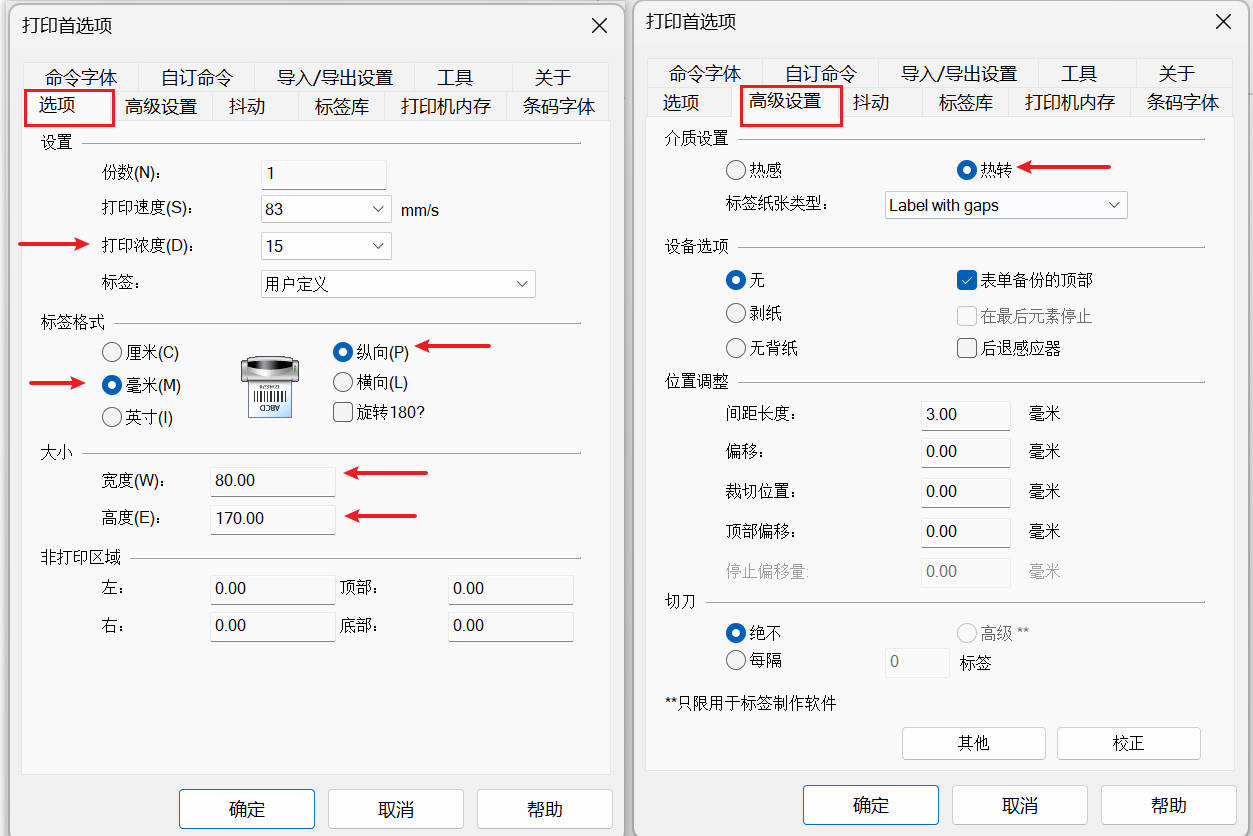
顺序 内容 参考 1 安装驱动Zebra Setup Utilities https://supportcommunity.zebra.com/s/article/Zebra-Setup-Utilities-Downloading-ZSU-Configuring-Printer-Settings?language=en_US 2 配置打印机首选项 https://redmine.easydingzhi.com/attachments/248 3 共享该打印机 -
- 2. Windows本地局域网的电脑连接网络打印机打印
顺序 内容 参考 1 访问打印机服务器的ip地址,比如: \\192.168.3.188 -》 自动安装驱动 - 2 参考服务器配置本地打印机首选项 https://redmine.easydingzhi.com/attachments/248
- 3. Mobile设备连接打印机打印
方案 :Old: 移动端直接发送给代理服务器 1. 手机端生成图片(url 或者 blob) 2. 图片发送给【代理服务器 并 转换成ZPL图片】 3. 代理服务器 ZPL图片 直接发送给Zebra打印机【端口:9100】打印 New: 移动端发送给云服务,然后代理服务器轮询拉取打印任务 1. 手机端生成图片(blob) 2. 图片发送给云服务 3. 代理服务器轮询(每3s)得到打印任务 并 下载图片转换成ZPL图片。 4. 代理服务器 ZPL图片 直接发送给Zebra打印机【端口:9100】打印
方案(Zebra Web Print方案) :未采用1. Zebra Web Print 并不是为手机端设计的,它是桌面浏览器方案;手机端必须依赖 Zebra 的 App,或者彻底绕开它,用代理服务器直连打印机。 - Android Zebra App(接管打印):支持有限 - iOS 基本不可用 资料:https://www.zebra.com/content/dam/support-dam/en/documentation/unrestricted/guide/software/zebra-browser-print-user-guide-v1-3-2-android-en-us.pdf
- Git提交
#xxx(redmine number): xxx(redmine title) - xxx(任意:补充内容)
- 代码规范
2.1: 结构:Public -> Protected -> Private
2.2: 其他代码规范同SBX
- MVCL的v3/v4物理分割
3.1: v3/v4的代码分为两个文件,比如: order.php, order_v3.php
3.2: system也分为两个文件,暂时只有一个user_v3
- Note: front的$this->user在v4中会替换为$this->customer, 即v4中需要清除$this->user
3.3: 代码中,区分v3/v4的调用,比如:new User_V3
- 前台代码
twig, js, css (js, css尽量写在单独的css文件中)
- 后台代码
MVCL (L:en,cn)
- 注释
- 类名:
/**
 * xxx
 *
 * @copyright RedBlue-OTS 2024
 * @version v4
 *
 */
- 函数名:参数类型 + 返回值类型
    /**
     * xxx
     *
     * @param  xxx $xxx
     * @param  xxx $xxx
     * @return xxx
     */
- 类名:
- Report and Solution
Others
Files
| Zebra 888-TT 打印机首选项配置.jpg (136 KB) Zebra 888-TT 打印机首选项配置.jpg | Zebra 888-TT 打印机首选项配置 | ||
| Mobility Print.apk (3.46 MB) Mobility Print.apk | Android - Mobility Print.apk |
ZY Updated by Zhongbao Ye 4 months ago
ZY Updated by Zhongbao Ye 4 months ago
- File Mobility Print.apk Mobility Print.apk added
ZY Updated by Zhongbao Ye 4 months ago
- Description updated (diff)
ZY Updated by Zhongbao Ye 4 months ago
- Status changed from 进行中 to 已关闭
- % Done changed from 50 to 100
ZY Updated by Zhongbao Ye 3 months ago
- Description updated (diff)
XF Updated by Xihua Fan about 2 months ago
- Subject changed from v4.0: Mobile devices support web printing to v4.0: Mobile devices support web printing - 最终方案(云打印)
- % Done changed from 100 to 90
XF Updated by Xihua Fan about 2 months ago
- Status changed from 已关闭 to 进行中
JZ Updated by Junyi Zhang about 2 months ago
- Description updated (diff)
JZ Updated by Junyi Zhang about 1 month ago
- Status changed from 进行中 to 已关闭
- % Done changed from 90 to 100
Actions