Actions
追加功能 #297
closed
XF
ZY
Add summary total points group by operator in turnover function
追加功能 #297:
Add summary total points group by operator in turnover function
Description
Task Details
- [turnover function] 添加按【操作员】的分类汇总积分
- Title修改
Team行:Display Products total points: -> Team points:
Operator行:Display Products total points: -> Personal points: - Operator汇总添加Special产品的数量和点数
比如Andy: 90.76 -> 90.76 Special: Order Qty(100) Points(10)
Special产品 = [Special - ]开头的产品名 比如[Special - Display 或者 Special - Promotion]
- 注意点:【操作员】order状态一般为(Production Started),其他状态不一定是【操作员】,可能是【物流】或者【检查者:比如Daping修改为Order Finished】
- turnover points 计算标准(公式)
Point (P): 根据产品的难易度预先设置的点数(分数)
Quantity (Q): 产品下单数量
Index1 - 3 (I1-3): 设置3个临界产品数量值
Coefficient1 - 3 (C1-3): 设置3个产品区间的系数(点数)
Coefficient4 (C4):设置系数(点数)当Quantity >= Index4的时候( 未使用 )No. Remake Urgency Rank1: Q <= I1 Rank2: I1 < Q <= I2 Rank3: I2 < Q <= I3 Rank4: Q > I3 1 No Normal P1 = Q / I1 * C1 P2 = C1 + (Q- I1) / I1 * C2 P3 = C1 + (I2- I1) / I1 * C2 + (Q - I2) / I1 * C3 P4 = C1 + (I2- I1) / I1 * C2 + (I3 - I2) / I1 * C3 2 No Express P1 / 2 P2 / 2 P3 / 2 P4 / 2 3 No DoubleExpress P1 P2 P3 P4 4 Yes Normal P1 x 3 P2 x 3 P3 x 3 P4 x 3 5 Yes Express P1 x 3 P2 x 3 P3 x 3 P4 x 3 6 Yes DoubleExpress P1 x 3 P2 x 3 P3 x 3 P4 x 3
- Questions
- Remake = 1 and Urgency = DoubleExpress 的时候, 3倍的系数(和Normal)扣除是否合理?
Daping:bug,Remake的时候全部3倍惩罚,另外:Remake的时候应该自动设置 Urgency=DoubleExpress, 关联 #294 - Operator 和 order状态 的关系表考虑创建(t_order_history表),记录所有状态更新的Operator,实际的跟单Operator = Production Started
Daping:OK,可以添加一个订单状态 Operator = Production Started or Ready for Shipment - Operator 汇总点数以外,是否需要罗列出所有产品+Order的数据?
Daping: 只需要各个Operator的汇总点数 - Operator 汇总点数Others包括了没有点数的Operators
Daping: - 需要显示所有Operators的汇总信息(即使是0分),Operators = User Role(operator)and Is Block(false)and Companey Abbreviation( RBSH )and Is Delete(false)
- For non- RBSH personnel, personal data in the turnover cannot be viewed.
- Daping
- Report and Solution
Others
Files
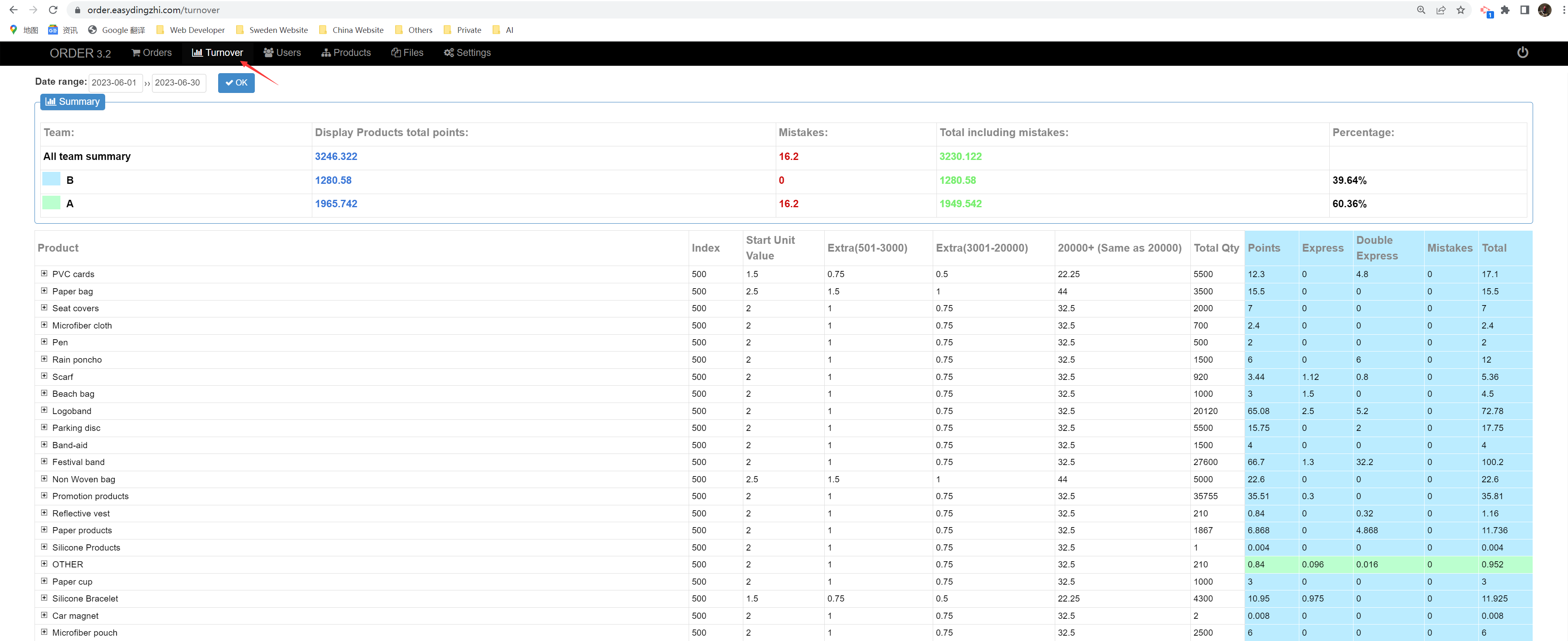
XF Updated by Xihua Fan over 2 years ago
- File turn over.png turn over.png added
XF Updated by Xihua Fan over 2 years ago
- Description updated (diff)
XF Updated by Xihua Fan over 2 years ago
- Description updated (diff)
XF Updated by Xihua Fan over 2 years ago
- Description updated (diff)
ZY Updated by Zhongbao Ye over 2 years ago
- Due date changed from 08/31/2023 to 08/28/2023
- Start date changed from 08/01/2023 to 08/24/2023
- Estimated time changed from 8.00 h to 24.00 h
XF Updated by Xihua Fan over 2 years ago
- Due date changed from 08/28/2023 to 08/25/2023
- Start date changed from 08/24/2023 to 08/23/2023
ZY Updated by Zhongbao Ye over 2 years ago
Output(2023/08/23 ~ 2023/08/24 居家)
- Databases :
CREATE TABLE `t_order_history` (
  `id` bigint(20) NOT NULL AUTO_INCREMENT COMMENT '订单历史记录ID(主键)',
  `order_id` bigint(20) NOT NULL COMMENT '订单ID',
  `order_product_id` bigint(20) NOT NULL COMMENT '订单产品ID',
  `order_product_status` varchar(5) NOT NULL COMMENT '订单产品状态',
  `create_user` bigint(20) NOT NULL COMMENT '创建用户ID',
  `create_time` int(15) unsigned NOT NULL COMMENT '创建时间',
  `update_user` bigint(20) NOT NULL COMMENT '更新用户ID',
  `update_time` int(15) unsigned NOT NULL COMMENT '更新时间',
  PRIMARY KEY (`id`),
  KEY `order_id` (`order_id`),
  KEY `order_product_id` (`order_product_id`),
  KEY `order_product_status` (`order_product_status`),
  KEY `create_user` (`create_user`)
) ENGINE=InnoDB DEFAULT CHARSET=utf8 ROW_FORMAT=COMPACT COMMENT='订单状态历史表'
- Van的一些注释(建议)
- 保持注释中文统一 :COMMENT 'ID' -> COMMENT '订单历史记录ID(主键)'
- 优化 :添加order_id,order_product_id的索引键(比如:UNIQUE INDEX),担心该表的记录会越来越多,需要考虑select慢查询的优化
Note:具体添加哪些字段,需要根据实际使用判断(主要是看where条件使用的字段等) - 删除不必要的字段 :update_user,update_time,感觉只有Insert,Select操作,不会出现Update
- 数据冗余 :history表一般添加status变化时的记录,然后根据要求抽出最新时间的值(比如create_user),担心数据量会暴增,不知道有什么优化方案。
建议在OTS运维的时候,添加该表count(*)总数的监测,如果总数 >= 100 000 级别,需要组内讨论对应办法(优化数据查询)
- Bruce 的回复
- 赞成,应该统一,sql 已更新
- 赞成,应该添加索引。sql 已更新。我添加了4个字段的索引:order_id,order_product_id,order_product_status,create_user。这些字段在后续绩点查询到人,都会用到。
- 建议保留。一方面与其他数据表结构保持统一,另一方面框架自身会维护这些字段。
- 暂时想到的方案:
- 订单保存时,只有订单状态发生变化,才写入数据表(另一方面说,这本来就该这样,不算是优化方案,我只是考虑我们处理的精细程度,是订单保存时,无条件存储订单状态,还是细化到,只有当订单状态变化才存储)。
- 不是所有订单状态都存储,只存储特定的状态,比如: Production Started and Ready for Shipment。系统有18种订单状态(部分已经废弃,常用只有7种)。如果只存储前面2个,相比存储所有状态那数据量会大大减少。
- 我查看系统,2022年一年订单数8000多,就按照10000比算,7种订单状态都存储,该表一年数据7万条(当然有些订单状态可能由A->B->A,这种应该少数,可以忽略)。10年就按照100万条推算。这个增长量感觉不是很高,mysql应该能撑得住。
- 步骤1: 找到系统所有能更新订单状态的地方,添加如下逻辑:判断订单状态是否被修改,如果修改,则写入t_order_history表。 (100%)
- 单个订单新增/修改:saveByAjaxAction/saveBySubmitAction
- 根据子订单,批量更新子订单状态:updateStatusAction
- 根据主订单,批量更新主订单下所有子订单的状态:updateStatusBatchAction
- 步骤2: turnover function 的改造 (100%)
- 模拟测试数据,测试统计结果的准确性。
- 代码的整理,统一处理方案1。
- 方案1:按照当前文件的代码风格,统一新添加的代码格式,老代码格式不做调整。优势:方便查看差分代码。
方案2:修改了A文件,就将A文件所有代码都整理一遍。优势:代码更加整洁,可读性更高。方案3:case by case。如果插入的是一整段function,只维护当前插入的function。如果修改了既存的function,维护整个function,或者整个文件。
- 个人建议:关于js文件,目前项目文件是压缩的。可读性很差,代码编写也不是很方便。
本人建议将chrome 浏览器格式化后的js文件同步到服务器,然后在这个基础上进行编辑修改。这样可读性和后期查看差分更加方便。
( 根据Van的建议暂时只在原有文件上修改,如果复杂到不能修改时,再另外讨论 )
XF Updated by Xihua Fan over 2 years ago
- Description updated (diff)
ZY Updated by Zhongbao Ye over 2 years ago
- % Done changed from 0 to 50
ZY Updated by Zhongbao Ye over 2 years ago
- % Done changed from 50 to 80
ZY Updated by Zhongbao Ye over 2 years ago
- Status changed from 进行中 to 已关闭
- % Done changed from 80 to 100
Output(2023/08/25 九亭)
- Solution:
1. Add a new table t_order_history. Stores a record of order status changes and identifies the order operator by order_product_status = 30/60 (30: Production Started, 60:Ready for Shipment) .
2. According to the operator grouping, loop order data, calculate the order performance points, and then accumulated to the different operator's name.
3. The turnover query interface(https://{{store_url}}/turnover/query?start=2023-08-01&finish=2023-08-28) returns the data structure:{ "success": true, "message": "", "data": { "productTurnovers": { "3": { "startDate": "2023-03-01", "finishDate": "2023-03-01", "color": "#BBECFF", "id": "3", "name": "Paper bag", "team": "B", "index1": "500", "index2": "3000", "index3": "20000", "coefficient1": "2.50", "coefficient2": "1.50", "coefficient3": "1.00", "coefficient4": "44.00", "totalQty": 100, "points": 45, "express": 0, "doubleExpress": 0, "mistakes": 0, "total": 45 }, "126": { "startDate": "2023-03-01", "finishDate": "2023-03-01", "color": "#BBFFCF", "id": "126", "name": "Ribbon", "team": "A", "index1": "1", "index2": "10", "index3": "25", "coefficient1": "0.50", "coefficient2": "0.35", "coefficient3": "0.25", "coefficient4": "7.50", "totalQty": 30, "points": 55, "express": 0, "doubleExpress": 0, "mistakes": 0, "total": 55 }, }, "operatorDetailTurnovers": { // new "135": { "startDate": "2023-03-01", "finishDate": "2023-03-01", "color": null, "id": "135", "name": "Catrin", "index1": "500", "index2": "3000", "index3": "20000", "coefficient1": "2.50", "coefficient2": "1.50", "coefficient3": "1.00", "coefficient4": "44.00", "totalQty": 102, "points": 2, "express": 0, "doubleExpress": 0, "mistakes": 0, "total": 2, "order_product_ids": "75502,75508," }, "9999": { "startDate": "2023-03-01", "finishDate": "2023-03-01", "color": null, "id": 9999, "name": "Others", "index1": "1", "index2": "5", "index3": "10", "coefficient1": "3.00", "coefficient2": "2.00", "coefficient3": "1.00", "coefficient4": "16.00", "totalQty": 5765, "points": 98, "express": 0, "doubleExpress": 0, "mistakes": 0, "total": 98, "order_product_ids": "75503,75504,75505," }, }, "teamTurnovers": [ { "color": "#BBECFF", "team": "B", "points": 45, "mistakes": 0, "summation": 45, "percentage": "45%" }, { "color": "#BBFFCF", "team": "A", "points": 55, "mistakes": 0, "summation": 55, "percentage": "55%" } ], "operatorTurnovers": [ // new { "color": "", "operator_id": "135", "operator_name": "Catrin", "order_product_ids": "", "points": 2, "mistakes": 0, "summation": 2, "percentage": "2%" }, { "color": "", "operator_id": 9999, "operator_name": "Others", "order_product_ids": "", "points": 98, "mistakes": 0, "summation": 98, "percentage": "98%" }, ], "totalPoints": 100, "totalMistakes": 0, "totalSummation": 100 } }
4. Add an additional operator detail interface(https://{{store_url}}/turnover/operator_detail?start=2023-03-01&finish=2023-03-31&orderProductIds=75502,75508,): query the operator's current total performance points corresponding to the order information.
- Step 1:Accessing the turnover query interface:https://{{store_url}}/turnover/query?start=2023-08-01&finish=2023-08-28
- Step 2:Open Chrome DevTools with F12, click the Network tab to see the Response returned by query?start=2023-08-01&finish=2023-08-28
- Step 3:To view the results returned by the interface. View orde_product_ids data under field operatorDetailTurnovers by operator_id, This data is then passed to the third parameter of the operator detail interface.
- Step 4: For example, operator_id = 135, refer to the turnover query interface and use ['operatorDetailTurnovers']['135']['order_product_ids'] to get the details of the operator.
- Returned data structure:
  "success": true,
  "message": "",
  "data": [
    {
      "order_id": "64966",
      "order_product_id": "75502",
      "caIndex": "RBSE49781",
      "totalIndex": "65128",
      "orderName": "2004052 - Ludvig & Co",
      "productName": "Name badge",
      "remake": "0",
      "urgency": "0",
      "product_type_id": "45",
      "quantity": "1",
      "points": "1.00",
      "express": 0,
      "doubleExpress": 0,
      "mistakes": 0,
      "total": 1
    },
    {
      "order_id": "65168",
      "order_product_id": "75508",
      "caIndex": "RBSE49966",
      "totalIndex": "65330",
      "orderName": "173925 Karolinska Institutet",
      "productName": "Softwall",
      "remake": "0",
      "urgency": "0",
      "product_type_id": "93",
      "quantity": "1",
      "points": "1.00",
      "express": 0,
      "doubleExpress": 0,
      "mistakes": 0,
      "total": 1
    }
  ]
}
5. Operators = User Role(operator)and Is Block(false)and Companey Abbreviation(RBSH)and Is Delete(false)
6. Need to show summary information for all Operators (even if it's a score of 0)
- Related code files:
protected/actions/order/UpdateStatusAction.php
protected/actions/order/UpdateStatusBatchAction.php
protected/actions/turnover/QueryAction.php
protected/actions/turnover/OperatorDetailAction.php(new)
protected/controllers/TurnoverController.php
protected/models/OrderHistory.php(new)
protected/services/TurnoverService.php
protected/services/UserService.php
protected/services/OrderService.php
protected/views/turnover/index.php
ui/desktop/js/turnover.js
XF Updated by Xihua Fan over 2 years ago
- Description updated (diff)
ZY Updated by Zhongbao Ye over 2 years ago
- Status changed from 已关闭 to 进行中
- % Done changed from 100 to 90
ZY Updated by Zhongbao Ye over 2 years ago
- Status changed from 进行中 to 已关闭
- % Done changed from 90 to 100
ZY Updated by Zhongbao Ye over 2 years ago
- Description updated (diff)
XF Updated by Xihua Fan over 2 years ago
- Description updated (diff)
XF Updated by Xihua Fan over 2 years ago
- Description updated (diff)
XF Updated by Xihua Fan almost 2 years ago
- Description updated (diff)
XF Updated by Xihua Fan over 1 year ago
- Target version set to v3.0
Actions