Actions
修改功能 #291
closed
XF
ZY
New design for print style (some need to be highlighted)
修改功能 #291:
New design for print style (some need to be highlighted)
Description
Task Details
- 唛头打印需要重新设计,部分需要突出显示(字体放大,换行等),可能页面打印行数也需要调整
- 等待物流团队提供更准确的layout design
- 固定唛头打印按钮的位置
- Tom & Jennifer
- Report and Solution
Others
Files
| 唛头修改说明.docx (754 KB) 唛头修改说明.docx | |||
| 唛头_直发客户.pdf (231 KB) 唛头_直发客户.pdf | |||
| 唛头_直发瑞典STO.pdf (225 KB) 唛头_直发瑞典STO.pdf | |||
| OTS唛头修改说明-更新版2023-08-22.docx (833 KB) OTS唛头修改说明-更新版2023-08-22.docx | |||
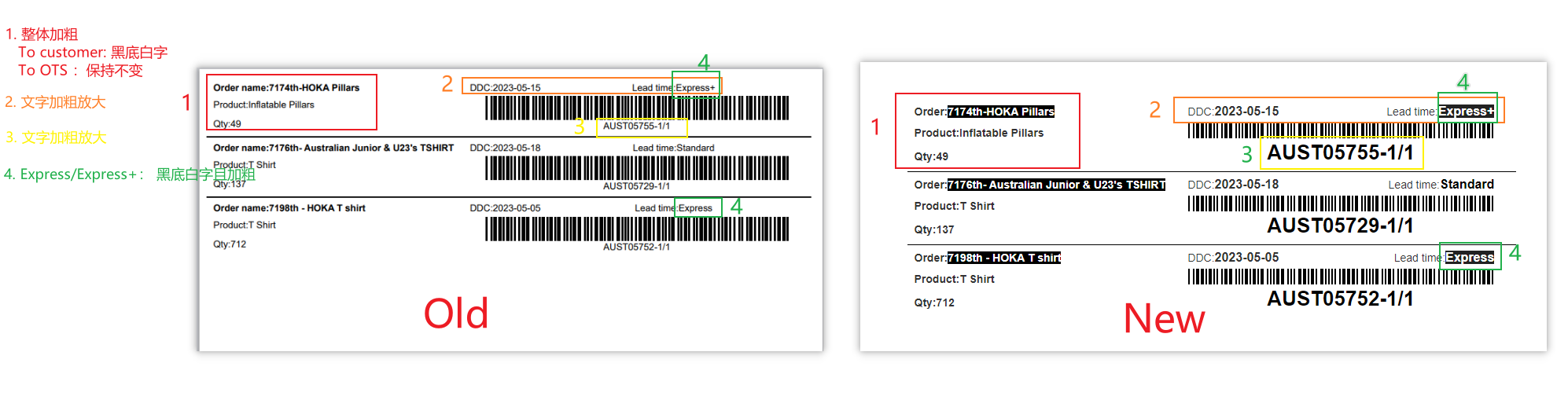
| mix.png (119 KB) mix.png | mix 的改变内容说明 | ||
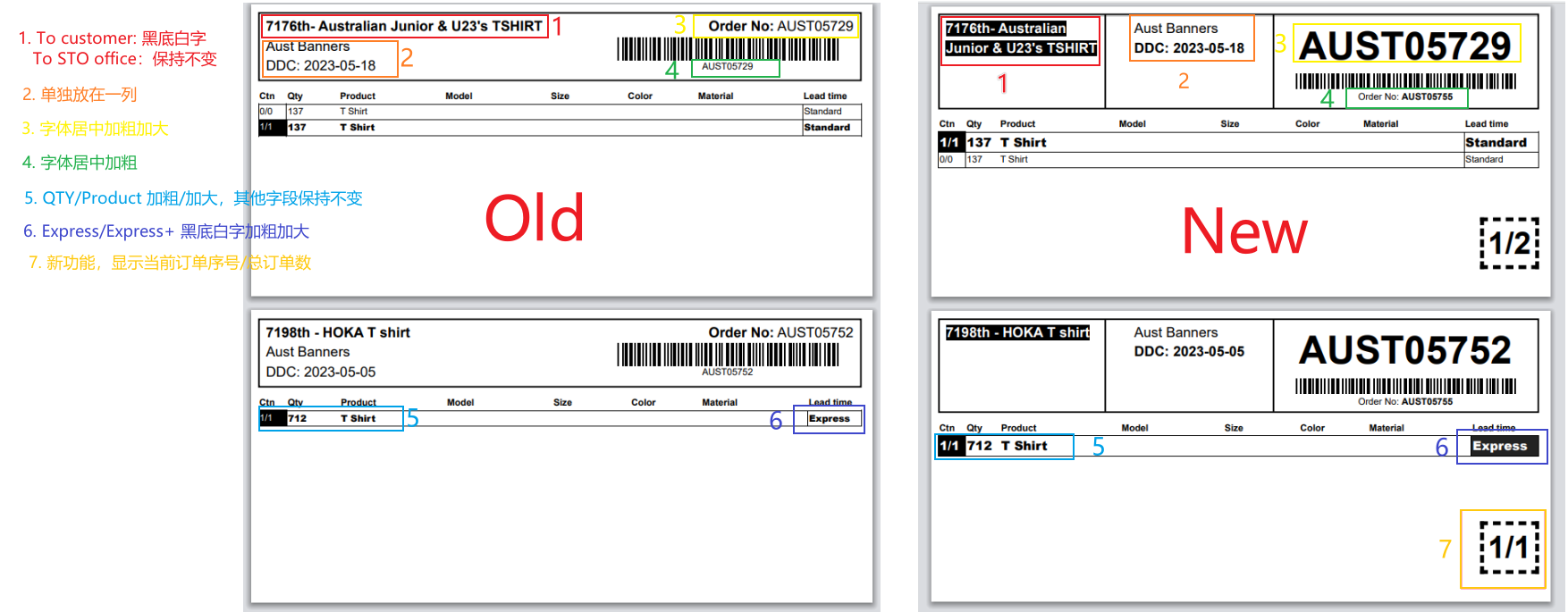
| separate.png (202 KB) separate.png | separate的改变内容说明 |
XF Updated by Xihua Fan over 2 years ago
- Copied to 解析Bug #292: Toggle checkbox should only on checkbox zone not whole line added
XF Updated by Xihua Fan over 2 years ago
- File 唛头修改说明.docx 唛头修改说明.docx added
- File 唛头_直发客户.pdf 唛头_直发客户.pdf added
- File 唛头_直发瑞典STO.pdf 唛头_直发瑞典STO.pdf added
- Due date changed from 07/21/2023 to 07/28/2023
- Start date changed from 07/20/2023 to 07/24/2023
FYI: 来自Jennifer的说明资料
ZY Updated by Zhongbao Ye over 2 years ago
- Due date changed from 07/28/2023 to 08/18/2023
- Start date changed from 07/24/2023 to 08/18/2023
ZY Updated by Zhongbao Ye over 2 years ago
- % Done changed from 0 to 90
Output(2023/08/18 居家)
- New design for print style (90%)
- 模板中右下角显示内容未完成:当前订单序号/总订单数
ZY Updated by Zhongbao Ye over 2 years ago
- Status changed from 进行中 to 已关闭
- % Done changed from 90 to 100
Output(2023/08/21 九亭)
Changes:
Changes:
- If delivery to customer, Order Nmae becomes white on black. No change is required for delivery to STO.
- The retailer name and ship time are in a separate column.
- Expanded font size for barcode value.
- When a sub-order is selected, the corresponding CTN column becomes white on a black background, and the quantity and product name are bolded.
- If the Lead time of the order is Express/Epress+, then the Lead time section becomes white on black.
- The lower right corner of the mark shows the current order serial number/total orders.
- Add additional css processing for the height of the last page for print integrity.
- Solution: According to the pdf design, modify the font size, page layout
protected/views/order/print.php
protected/actions/order/PrintShippingMarksAction.php
ZY Updated by Zhongbao Ye over 2 years ago
XF Updated by Xihua Fan over 2 years ago
- Status changed from 已关闭 to 进行中
- % Done changed from 100 to 90
To Bruce
Solution: According to the pdf design, modify the font size, page layout
可能背景色需要【实机打印测试】,没有测试到位?
现在问题点:背景色(黑色)也需要打印
请阐述可能的解决方案?!
To Van:
通过调节css解决该问题。针对打印文件中需要黑底白字的标签添加如下行内样式:background:#000000 !important;color: #FFFFFF !important;
XF Updated by Xihua Fan over 2 years ago
- Copied to deleted (解析Bug #292: Toggle checkbox should only on checkbox zone not whole line)
ZY Updated by Zhongbao Ye over 2 years ago
- Status changed from 进行中 to 已关闭
- % Done changed from 90 to 100
ZY Updated by Zhongbao Ye over 2 years ago
- File mix.png mix.png added
- File separate.png separate.png added
ZY Updated by Zhongbao Ye over 2 years ago
Output(2023/10/17) 九亭
- Avoid printing pagination whenever possible.
- Remove the fixed width of the following fields: Qty, Product, Model, Size, Color, Material
- Reduce the font size of extra info: 35px => 25px, reduce the font size of ctn-order: 40px => 30px
- If the height of the print area is > height of the container (.print-display), hide [Extra Info + Product Sort Order(e.g. 1/4)].
- Note: Order: RBSE50607 is not reproduced. Order: RBSE50819 is reproduced.
- protected/views/order/print.php
XF Updated by Xihua Fan over 1 year ago
- Target version set to v3.0
ZY Updated by Zhongbao Ye over 1 year ago
- Description updated (diff)
ZY Updated by Zhongbao Ye over 1 year ago
Output(2024/11/13) 九亭
- Fixed mark print button
- When opening the mark printing page multiple times, the print button on the page disappears.
Solution: Remove the button positioning logic in the third-party plug-in and directly use the inline style to fix the button.
- When opening the mark printing page multiple times, the print button on the page disappears.
- protected/views/order/print.php
Actions